

Description
Download Google Workspace to Office 365 Migration Tool – Free, Secure & Efficient Data Transfer Software
The Cigati Google Workspace to Office 365 Migration Tool is a powerful, free software designed to simplify the transition from Google Workspace to Microsoft Office 365. This migration tool ensures a secure, fast, and error-free transfer of emails, contacts, calendars, and other critical data. Ideal for businesses and individuals alike, it supports seamless migration across Windows, Mac, Android, and iOS platforms, making it one of the most versatile tools in its category. With intuitive controls and robust security protocols, this utility eliminates the complexity of manual data transfer, reducing downtime and minimizing risks.
Why Choose the Cigati Google Workspace to Office 365 Migration Tool?
Transitioning from Google Workspace to Office 365 can be a daunting task, especially when dealing with large volumes of emails, shared calendars, and contact lists. The Cigati Google Workspace to Office 365 Migration Tool is engineered to make this shift not only manageable but efficient and stress-free. Unlike manual export-import methods that are time-consuming and prone to errors, this software automates the entire process with precision. It supports full mailbox migration, including archived emails and attachments, ensuring no data is lost during the transfer. The tool also maintains folder structures and metadata, preserving the original organization of your digital workspace.
One of the standout features is its secure authentication system, which uses OAuth 2.0 to connect to both Google Workspace and Office 365 without requiring you to share passwords. This ensures your credentials remain protected throughout the migration. The software also includes real-time progress tracking, allowing you to monitor the status of each migration task. Whether you're migrating a single user or an entire organization, the tool scales accordingly. Its lightweight design ensures minimal system resource usage, making it suitable for both high-end and mid-tier machines. With automatic updates and a clean, intuitive interface, the Cigati tool stands out as a reliable, user-friendly solution for anyone planning a cloud platform switch.
Additionally, the tool offers customizable migration schedules, enabling users to perform migrations during off-peak hours to avoid disrupting daily workflows. It also supports selective migration, so you can choose specific mailboxes, folders, or date ranges to transfer. This level of control is essential for organizations with compliance or data governance requirements. Overall, the Cigati tool is more than just a data transfer utility—it’s a strategic migration partner that ensures business continuity and operational efficiency.
Key Features and Capabilities of the Migration Tool
The Cigati Google Workspace to Office 365 Migration Tool comes packed with advanced features designed to streamline the migration process and enhance user control. One of the most critical features is multi-user migration support, allowing administrators to migrate entire teams or departments in a single batch. This is particularly beneficial for medium to large enterprises transitioning from Google Workspace to Office 365. The tool also supports incremental migration, which means it can sync new data after the initial transfer, ensuring your Office 365 environment stays up to date with minimal effort.
Another major highlight is preservation of metadata and folder hierarchy. When migrating emails and documents, the tool maintains original timestamps, sender/recipient information, and folder structures, ensuring that your data remains organized and easily searchable in Office 365. This is crucial for maintaining productivity post-migration. The real-time logging and reporting feature provides detailed migration logs, including success rates, errors, and skipped items, which can be exported for auditing or troubleshooting purposes.
The tool also includes data filtering and mapping options, allowing users to exclude specific file types, filter by date, or map Google Workspace labels to Office 365 folders. This flexibility is essential for organizations with strict data retention policies. Furthermore, secure encryption during transfer ensures that all data is protected while in transit, using industry-standard SSL/TLS protocols. The tool is compatible with both Google Workspace (G Suite) and Microsoft 365 (Office 365) environments, supporting all major versions of both platforms. With automatic conflict resolution, the software intelligently handles duplicate entries, preventing data loss or overwrites.
- Full migration of emails, contacts, calendars, and documents
- Preservation of folder structure and metadata
- Secure OAuth 2.0 authentication
- Support for incremental and batch migration
- Real-time progress tracking and detailed logs
- Customizable filtering and mapping options
- Encrypted data transfer using SSL/TLS
- Compatibility with Windows, Mac, Android, and iOS
How to Install and Use the Cigati Migration Tool
Getting started with the Cigati Google Workspace to Office 365 Migration Tool is straightforward, even for users with limited technical experience. The first step is to download the software from the official Cigati website. The tool is available as a free download for Windows and Mac, with mobile versions for Android and iOS to manage migration tasks on the go. Once downloaded, run the installer and follow the on-screen instructions—no complex setup is required.
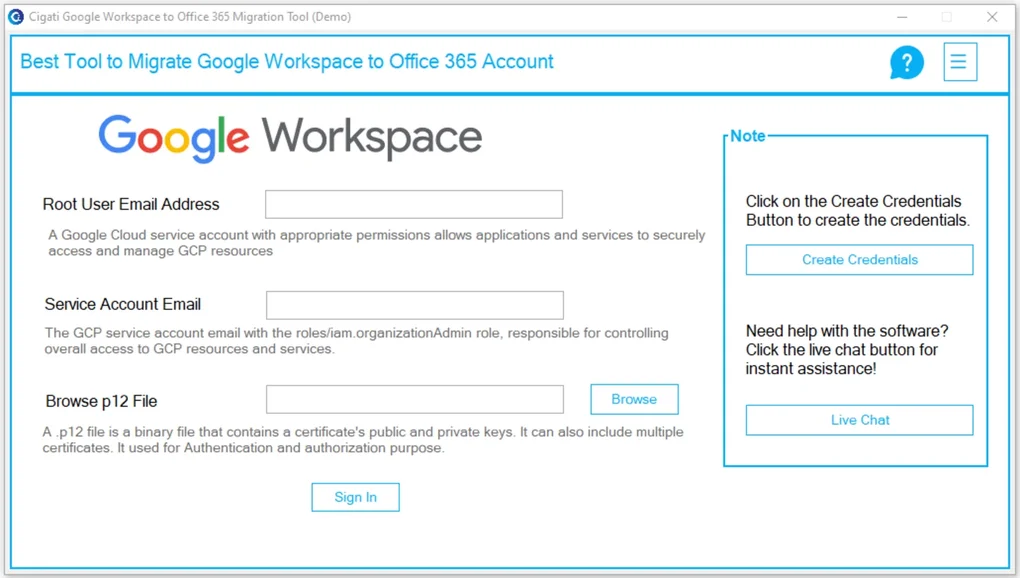
After installation, launch the application and sign in to your Google Workspace account using OAuth 2.0. This secure method avoids password sharing and ensures your credentials are never stored locally. Next, connect to your Office 365 account using the same authentication method. Once both accounts are verified, the tool will display a list of available mailboxes and data types for migration.
From here, you can select individual users or entire groups for migration. You can also specify which data types to transfer—emails, contacts, calendars, or all. The tool allows you to define migration filters, such as date ranges or specific folders. Once settings are configured, click “Start Migration.” The software will begin transferring data in real time, with a progress bar and status updates visible on the dashboard.
For advanced users, the tool supports command-line interface (CLI) mode, enabling automation via scripts. This is ideal for IT administrators managing large-scale migrations. The software also provides automatic update notifications, ensuring you always have access to the latest security patches and performance improvements. After migration, you can verify data integrity by comparing source and destination folders directly within the app. With its intuitive design and step-by-step guidance, the Cigati tool makes the entire process accessible to users of all skill levels.
Compatibility and System Requirements
The Cigati Google Workspace to Office 365 Migration Tool is designed for maximum accessibility, supporting a wide range of operating systems and devices. It is fully compatible with Windows 10 and later, including Windows 11, making it suitable for enterprise desktops and laptops. For Mac users, the tool runs smoothly on macOS 10.15 (Catalina) and newer, ensuring compatibility with both Intel and Apple Silicon (M1/M2) Macs.
For mobile users, the app is available on Android (version 8.0 and above) and iOS (version 12 and above), allowing administrators to monitor migration progress, receive alerts, and manage tasks remotely. This cross-platform support is a major advantage, especially for IT teams managing hybrid work environments.
The system requirements are modest, ensuring the tool runs efficiently even on older hardware. It requires at least 2 GB of RAM, 500 MB of free disk space, and a stable internet connection. The software does not require administrator privileges for installation, making it ideal for use in restricted corporate environments. It also integrates seamlessly with existing corporate firewalls and proxy settings, minimizing deployment friction.
Additionally, the tool supports all major versions of Google Workspace and Office 365, including Business, Enterprise, and Education plans. Whether you're migrating from a small business account or a large-scale enterprise environment, the Cigati tool adapts to your needs. Its cloud-agnostic design ensures future-proofing, allowing for easy migration to other platforms if needed.
Pros and Cons of the Cigati Migration Tool
Pros
- Free to download and use with no hidden costs
- Secure OAuth 2.0 authentication with no password sharing
- Supports full migration of emails, contacts, calendars, and files
- Preserves folder structure, metadata, and timestamps
- Real-time progress tracking and detailed logging
- Compatible with Windows, Mac, Android, and iOS
- Incremental migration and conflict resolution built-in
- Intuitive interface suitable for non-technical users
Cons
- Limited advanced customization compared to paid tools
- No built-in support for third-party email clients
- Mobile app lacks full migration control (only monitoring)
- Customer support is primarily self-service
- Not ideal for extremely large enterprises without automation
Frequently Asked Questions (FAQ)
Is the Cigati Google Workspace to Office 365 Migration Tool free to use?
Yes, the Cigati Google Workspace to Office 365 Migration Tool is completely free to download and use. There are no subscription fees or hidden charges. It’s designed to provide a cost-effective solution for individuals and small to medium-sized businesses looking to migrate their data without investing in expensive software.
Can I migrate data from Google Workspace to Office 365 without losing folder structure?
Yes, the tool preserves the original folder hierarchy, labels, and metadata during migration. This ensures that your emails, contacts, and calendars remain organized in Office 365 just as they were in Google Workspace, minimizing the need for manual reorganization.
Does the tool support incremental migration?
Yes, the Cigati tool supports incremental migration, which allows you to sync new data after the initial transfer. This is especially useful for ongoing migrations or when you want to keep your Office 365 environment up to date with minimal downtime.
Is the migration process secure?
Absolutely. The tool uses OAuth 2.0 for secure authentication and encrypts all data in transit using SSL/TLS. Your credentials are never stored, and the software does not require password sharing, ensuring a high level of data security.
Can I use the tool on my mobile device?
Yes, the tool offers mobile apps for Android and iOS. While the full migration process is best managed from a desktop, the mobile apps allow you to monitor progress, receive alerts, and manage tasks remotely.
Final Verdict: A Reliable Choice for Cloud Migration
The Cigati Google Workspace to Office 365 Migration Tool is a powerful, free, and secure solution for anyone looking to transition their data between cloud platforms. With its intuitive interface, robust feature set, and strong security measures, it stands out as a top choice in the utilities & tools category. Whether you're a small business owner, IT administrator, or individual user, this tool simplifies the migration process while ensuring data integrity and minimal downtime.
Despite minor limitations in advanced customization and mobile control, the benefits far outweigh the drawbacks. The ability to migrate emails, contacts, calendars, and files securely and efficiently—without cost—is a game-changer. If you're planning a switch from Google Workspace to Office 365, this tool is an essential part of your migration strategy.
Download the Cigati Google Workspace to Office 365 Migration Tool today and make your transition seamless, secure, and stress-free.
Guides & Tutorials for Google Workspace to Office 365 Migration Tool
How to install Google Workspace to Office 365 Migration Tool
- Click the Preview / Download button above.
- Once redirected, accept the terms and click Install.
- Wait for the Google Workspace to Office 365 Migration Tool download to finish on your device.
How to use Google Workspace to Office 365 Migration Tool
This software is primarily used for its core features described above. Open the app after installation to explore its capabilities.
User Reviews for Google Workspace to Office 365 Migration Tool 0
No reviews found





